
If your product touches a physical address, you are making decisions about where in the real world something is happening. That sounds dramatic because it is. A single bad coordinate can mean a missed delivery, a false fraud flag, or a broken customer experience.
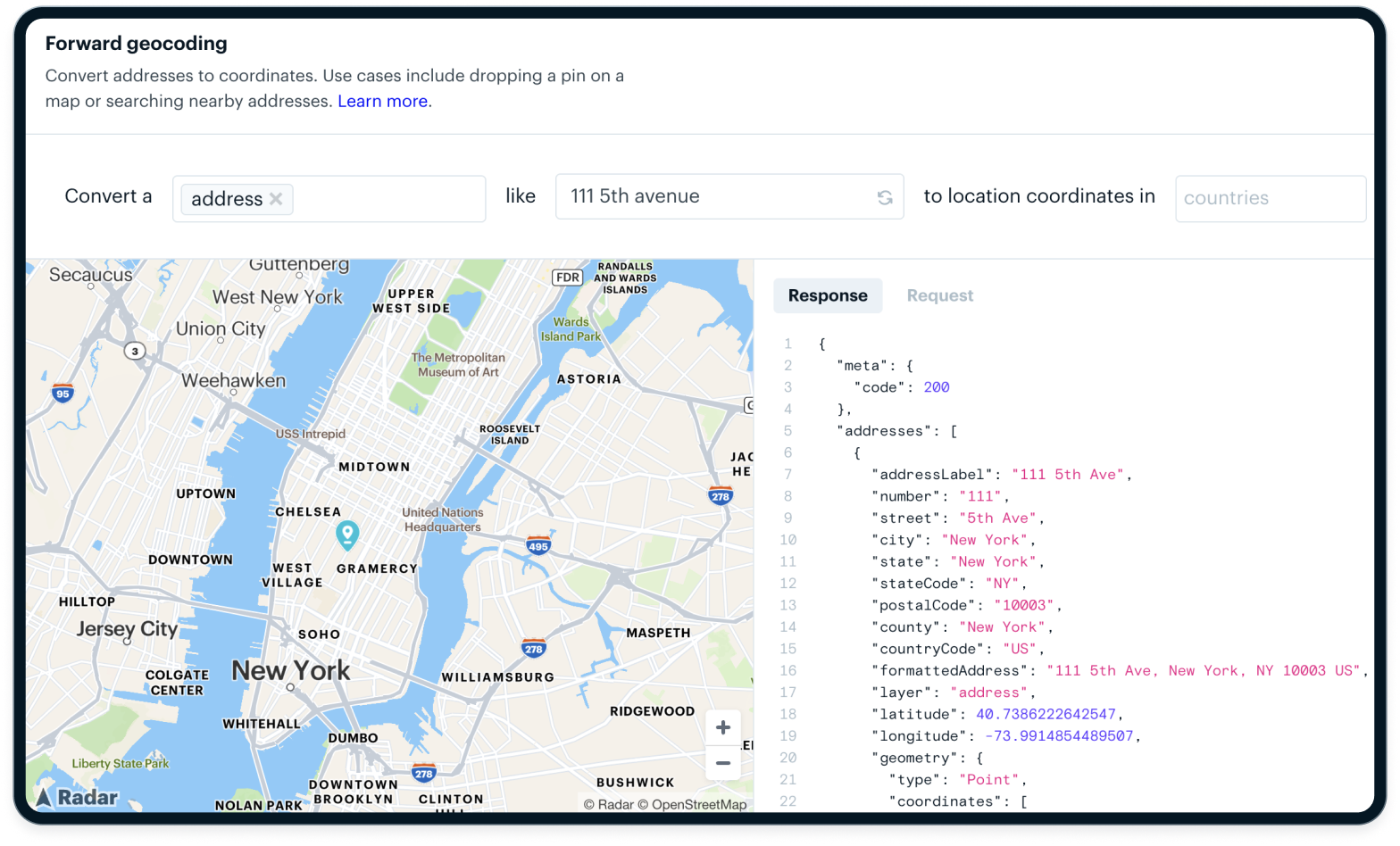
Geocoding turns text like "111 5th Avenue" into latitude and longitude. A geocoding API lets your app do that at scale. Reverse geocoding does the opposite. A reverse geocoding API takes coordinates from a device or GPS ping and turns them into a human readable address or place.
Most teams start the same way: drop a Google Maps widget into the UI, hit the Google Maps geocoding API, and move on. It works. Until it does not. At scale, that default choice can become one of your most expensive, least flexible pieces of infrastructure.
This guide is for teams at that inflection point. We will walk through how geocoding actually works, where accuracy breaks down, how pricing and licensing behave in the real world, and when modern platforms outperform Google Maps Platform.
What a geocoding API actually does (beyond the marketing)
On the surface, a geocoding API is simple: address in, coordinates out. Under the hood, it is a chain of parsing, searching, scoring, and ranking decisions that impact your product every day.
Forward vs. reverse geocoding
Forward geocoding is what most people think of first. You send an address or place string like "111 5th Avenue" and get back coordinates. That powers sign up flows, store locators, and address capture in checkout.
Reverse geocoding flips the direction. You send coordinates and a reverse geocoding API returns nearby addresses or places. That powers:
- Trip tracking and arrival detection.
- Geofencing and geolocation API use cases.
- Fraud checks and compliance rules.
- "You are here" UI in consumer apps.
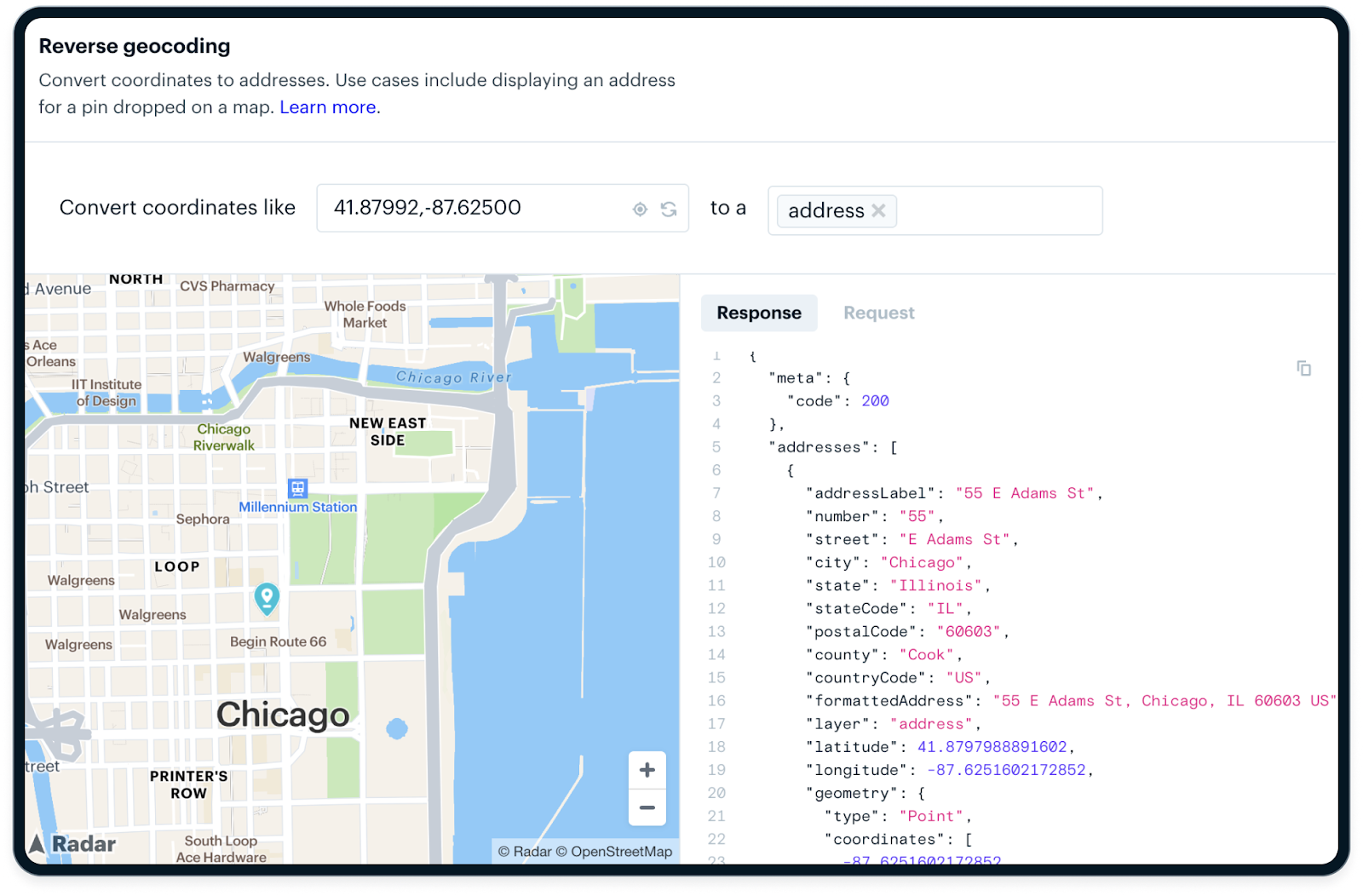
Reverse geocoding is often harder in production because your input is messy. GPS drifts indoors, drivers stop in the street, devices cache old locations. There might be several plausible addresses within a small radius. Your system needs predictable behavior, not just "closest point wins."
Place search vs. address resolution
Most providers blur at least three concepts:
- Place search: find points of interest, stores, and landmarks.
- Address lookup: find a specific postal address.
- Address resolution: resolve down to a parcel, building, or even unit level.
For a delivery marketplace, "Panera Bread" isn't a good enough answer. You care about:
- The correct location in the right shopping center.
- The door the driver should use.
- The entrance that actually matches proof-of-delivery photos.

A "correct" location on a consumer map can be operationally wrong if the pin is in the middle of a mall parking lot rather than near the curb where drivers stop.
When you evaluate a geocoding API or address lookup API, look at how it handles:
- Multi tenant buildings and campuses.
- Multiple entrances for the same business.
- Unit level data when available.
Accuracy tiers that vendors rarely explain
Vendors love to talk about precision. Many decimal places. Meter level accuracy. But most geocoding APIs rely on multiple tiers of data:
- Rooftop: a point on or near the actual building footprint.
- Parcel centroid: a point somewhere within the land parcel.
- Street interpolation: a guessed point along a road segment based on address ranges.
- Locality centroid: a point in the middle of a city, zip code, or neighborhood.
Two providers can both tell you they are "within a few meters" and still give very different answers if one is using rooftop and the other is falling back to interpolation more often.
You want an API that exposes match types and confidence levels. Your code should treat a rooftop hit very differently from a locality centroid.
How geocoding APIs work under the hood
Once you understand the pipeline, vendor tradeoffs and pricing start to make more sense.
Address parsing and normalization
Every geocoding request starts as text. The API has to:
- Parse out tokens like street number, street name, unit, city, region, and postal code.
- Normalize abbreviations and formats, such as "
St" vs "Street" or "Apt 5" vs "Unit 5." - Handle country specific formats and languages.
This is where naive systems break. Some examples:
- The order of components varies by country.
- Many markets rely on landmarks rather than formal addresses.
- Some languages have multiple valid ways to write the same place.
A robust geocoding API or address validation API invests heavily in localized parsing and normalization. That is part of why internationalization is hard to bolt on later.
Reference datasets and scoring
After parsing, the API searches across reference datasets:
- Postal databases.
- Parcel and cadastral data.
- Road networks and intersections.
- Building footprints and POI data.
Each potential match gets a score based on how well it fits the parsed input. The API ranks these candidates and returns the top one, often with a confidence score and sometimes with alternative suggestions. Learn more about how our engineering team created a geospatial database to support these efforts.
For you, the important question isn't "does it use machine learning" but:
- Do I get a confidence signal I can act on.
- Can I see match types and levels.
- Can I configure or override behavior for my use cases.
A platform that exposes these details gives you more control than a black box that returns a single "best" result.
Caching, deduplication, and throughput
Behind a geocoding API, there is a lot of caching:
- Hot addresses, like popular locations, are often cached and fast.
- Rare or new addresses hit slower, more expensive parts of the system.
This is why your performance profile can change between:
- Cold cache traffic during a migration or backfill.
- Warm cache traffic during normal daily usage.
If you blast a provider with millions of near duplicate requests during an ETL job, you will find rate limits and long tail latencies you never saw during development. The best providers will help you with batching and deduplication, but you should still plan your own caching layer.
The hidden hard problems in geocoding
From the outside, geocoding looks solved. Inside a production system, it is anything but.
There is no single "correct" point for many addresses. Vendors make different tradeoffs, use different datasets, and update at different cadences.
You will see:
- The same address returning different coordinates across vendors.
- Urban addresses that look great while rural addresses drift.
- One entrance used for routing and another used for delivery photos.
If you treat geocoding results as exact truth, you will build brittle logic. Instead, treat them as probabilistic and design around ranges and confidence.
.png)
Rate limits, burst traffic, and API reliability
There is a big difference between:
- Occasional address lookups in a client form.
- Always on, high volume batch geocoding in a backend service.
When something goes wrong, naive retry logic can create a "retry storm" that makes things worse, not better. You end up with:
- Spikes in traffic just when the provider is struggling.
- Throttling and 429s.
- Bills that tell an unpleasant story at the end of the month.
Ask vendors to be explicit about:
- Rate limits and sustained QPS.
- Behavior when you hit those limits.
- Recommended retry strategies and backoff.
Data licensing and "you do not actually own your results"
This is where many teams get burned.
With some providers, you are not buying geocoding results. You are renting them, under terms that can limit:
- How long you can store results.
- Whether you can reuse results outside a specific product.
- Whether you must display results on the vendor map.
Those constraints ripple into:
- Internal analytics and BI.
- Machine learning pipelines.
- Customer exports and invoices.
If location data is foundational for your business, you want a provider that treats results as your data, with clear rights to store, reuse, and export.
Google Maps geocoding API, strengths and structural weaknesses
Let's talk about Google directly. You probably already use it somewhere.
Where Google is objectively strong
Google Maps Platform is excellent at:
- Global coverage and dense POI data.
- Familiar consumer map tiles and UI.
- Tight integration across Places, Routes, and Maps.
- Strong language and localization support.
If you are building a consumer app with a map centric UI and moderate volume, Google can be a reasonable default.
The real problems with Google for production geocoding
Problems appear as soon as geocoding becomes infrastructure, not just UX.
Common issues:
- Google Maps geocoding API pricing surprises after you cross free or low volume tiers.
- Sudden cost spikes when you run a backfill or batch process.
- Strict storage and reuse restrictions that make it hard to use results outside a Google map.
- Latency variability at higher volumes.
- Limited visibility into match confidence and scoring.
Google has to optimize its platform for search, navigation, and ads. That shows up in the product decisions your team feels.
Google is a consumer mapping company first, not a data infrastructure vendor
This is the key mindset shift.
Google builds for:
- User centric map browsing.
- Near real time navigation.
- Monetization through ads and related products.
It isn't optimized primarily for:
- High volume, server side geocoding at predictable cost.
- Compliance grade address validation API use cases.
- Operational logistics systems that need repeatable, auditable results.
That is why so many teams start on Google and then look for Google Maps alternatives or a Mapbox alternative as usage grows.
5 instances when Google is the wrong tool for geocoding
There are clear patterns where Google is the wrong default.
1. High volume batch geocoding. If you are:
- Backfilling millions of historical addresses.
- Migrating providers.
- Regularly enriching large datasets.
Per request pricing adds up quickly. Rate limits slow you down. Display only terms make it hard to push results into your data warehouse. You want a platform built for bulk geocoding and reuse.
2. Logistics, delivery, and fleet operations. For logistics, the details matter more than the branded map in your app. You care about:
- Which entrance matters for delivery.
- How reverse geocoding behaves in dense areas.
- How often results drift as buildings are added or updated.
A consumer focused map isn't tuned for repeated, high frequency geocoding of the same locations. A modern geocoding API combined with routing and geofencing is.
3. Regulated industries. If you operate in fintech, healthcare, or real money gaming, you have to think about:
- Data retention and deletion policies.
- Auditability of location decisions.
- Location spoofing and fraud.
Rigid storage and display requirements are not compatible with many of these obligations.
4. ML driven and analytics heavy systems. If you treat location as a signal for models, you need:
- Stable identifiers and consistent behavior over time.
- The right to store and reprocess historical geocoding results.
- Easy export to your ML and analytics stack.
This is hard to reconcile with strict license terms that limit reuse.
5. Offline or hybrid first products. If your product needs to work:
- At the edge.
- With intermittent connectivity.
- With precomputed data on device.
You will cache a lot. That means you need clear rights to cache and reuse results, not just short term lookups tied to a map view.
5 essentials when evaluating a geocoding API
Vendor selection gets easier when you have a clear checklist.
1. Accuracy and confidence handling, look for:
- Transparent match types, such as rooftop vs. interpolated vs. centroid.
- Stable behavior across repeated queries.
- Forward and reverse benchmarks for your target markets.
Then, in your own code, enforce thresholds and fallback behavior based on those signals.
2. Throughput and scale guarantees, ask:
- What sustained QPS you can run without special approval.
- What burst limits exist, and how they are enforced.
- Whether there is an SLA for uptime and latency.
For infrastructure, "best effort" isn't enough.
3. Pricing transparency, you want:
- A true partner to help optimize accuracy, opt-in, and everything in between.
- Explicit overage behavior and rate limits.
- Predictable cost at scale, including discounts for committed volume.
Pressure test pricing with realistic scenarios: seasonal spikes and bulk imports.
4. Data ownership and retention rights, make sure you understand:
- What you can store, and for how long.
- Where you can reuse results across products and teams.
- What you can export to warehouses, customers, and partners.
Loop in your legal and data teams early. It is much easier to negotiate this up front than to unwind it later.
5. Privacy and compliance, check:
- How PII, identifiers, and exact addresses are handled.
- Regional data residency options.
- Support for consent, opt out, and deletion workflows.
- Whether or not they have a Trust Center with resources.
If your product touches regulated data, your geocoding provider is part of your compliance footprint.
Google vs. modern geocoding platforms
At this point, the options usually look like three broad categories.
Architectural differences
- Google Maps Platform: a consumer first mapping ecosystem focused on maps, search, and navigation.
- Mapbox: a developer first mapping platform, a common Mapbox alternative to Google for customizable tiles and front end control.
- Radar: an infrastructure first location platform that combines geocoding API, geolocation API, address autocomplete API, address validation, geofencing, and trip tooling for teams that treat location as core infrastructure.
These are not just different brands. They are different product strategies.
Where specialized platforms outperform Google
Modern platforms like Radar often win when you need:
- Cost predictability instead of surprise bills.
- Clear legal rights to store, reuse, and export geocoding results.
- Consistent latency at scale.
- Operational tooling, including batch endpoints, webhooks, SDKs, and observability.
- Strong support for non visual use cases like logistics, compliance, and fraud, not just map display.
If that describes your roadmap, you want to benchmark beyond Google.
How teams actually deploy geocoding in production
It isn't just about which geocoding API you pick. How you integrate it matters.
Client side vs. server side geocoding
Client side geocoding in a browser or mobile app:
- Is easy to start.
- Exposes your API keys more directly.
- Gives you less control over rate limiting and caching.
Server side geocoding behind your own API:
- Centralizes control of keys, quotas, and retries.
- Lets you deduplicate and cache results across clients.
- Makes it easier to swap providers if you need to.
Most teams that scale end up moving critical geocoding into their backend.
Caching and rate limit shielding
You can save money and improve reliability by:
- Normalizing addresses before sending them to the provider.
- Caching responses by normalized address or coordinate.
- Implementing soft fail behavior where you reuse recent results during provider incidents.
Your cache is also a strategic asset. It makes it easier to migrate providers down the road.
Event pipelines and downstream systems
Geocoded data rarely stays in one place. It flows into:
- Messaging systems and event streams.
- Warehouses and BI tools.
- Fraud, routing, and personalization services.
That is why license terms and data ownership matter so much. Your geocoding provider isn't just one API. It is on the critical path to your entire data pipeline.
Multi-vendor redundancy
If geocoding is mission critical, a multi-vendor strategy is worth considering:
- Use a primary provider for most traffic.
- Fail over to a secondary when latency or error rates spike.
- Regularly sample both to watch accuracy in key regions.
This requires an abstraction layer on your side, but it reduces lock in and can improve reliability.
Common geocoding failure patterns
Patterns to avoid:
- Over trusting a single vendor without monitoring actual accuracy in your markets.
- Shipping with no fallback for partial, malformed, or international addresses.
- Treating geocoding as "set and forget" instead of a system to observe and tune.
- Ignoring match types and confidence, then wondering why edge cases break.
- Signing license terms that block analytics, ML, or customer exports later.
A few careful choices early will save you months of painful rework.
Choosing the right geocoding API for your product
Let us turn this into decisions.
Decision matrix by product type
- Consumer apps: prioritize UX, autocomplete quality, and map display. Google or a front end oriented provider can be fine at low to moderate volume, but keep an eye on cost and licensing as you grow.
- Marketplaces: prioritize global coverage, address quality for both sides of the marketplace, and stable identifiers for analytics. Data reuse and ownership become very important.
- Logistics and delivery: prioritize rooftop and entrance accuracy, reverse geocoding quality, routing, and SLAs. A logistics oriented platform with trips, events, and geofencing will usually beat a generic consumer map.
- Fraud and compliance: prioritize auditability, spoofing detection, consistent behavior, and storage rights that satisfy regulators.
- Internal analytics platforms: prioritize bulk geocoding, export rights, and tight integration with your warehouse and streaming stack.
When a platform like Radar makes more sense
A platform like Radar makes sense when you need more than just a geocoding endpoint.
For example, when you also need:
- Geofencing for location-based messaging, compliance, and trip logic.
- Location tracking and trip monitoring.
- Address validation API and address autocomplete API for clean checkout and signup flows.
- Routing, ETAs, and distance for logistics use cases.
And when you want:
- Infrastructure level SLAs and responsive support from location experts.
- Clear rights to reuse geocoding data internally across all your systems.
- Predictable pricing at scale instead of guesswork based on variable consumer usage.
If you are making a long term bet on location, this is usually the more strategic path.
Frequently asked questions
What is the difference between geocoding and reverse geocoding?
Geocoding turns addresses or place names into coordinates. Reverse geocoding turns coordinates into human readable addresses or places. You usually use a geocoding API in forms and search, and a reverse geocoding API in tracking, trips, and event streams.
Is Googles geocoding API free?
Google offers a limited free tier and then charges per request. Many teams only learn how Google Maps geocoding API pricing behaves after they launch, when usage patterns change and batch jobs run.
Can I store Google geocoding results?
It depends on the terms of your agreement. Historically, Google has limited how long and how broadly you can store and reuse geocoding results, especially outside a Google map. Always check current terms with your legal team.
What is the most accurate geocoding API?
There is no universal "most accurate" provider. Accuracy depends on your regions and use cases. The best geocoding API for you is the one that performs well where you operate, exposes match confidence, and fits your cost and licensing needs.
How do I validate addresses programmatically?
Use an address validation API and address autocomplete API to guide users to valid addresses and normalize input. Many platforms also offer an address lookup API that verifies and standardizes address components.
What is the best geocoding API for logistics?
For logistics, look for:
- Rooftop and entrance level accuracy.
- High quality reverse geocoding.
- Integration with routing, trips, and geofencing.
A logistics oriented platform that combines geocoding API, geolocation API, and operational tooling will usually outperform a general consumer mapping API.
How do I handle ambiguous addresses?
Combine product design and technical safeguards:
- Use autocomplete to steer users toward valid, unambiguous addresses.
- Use confidence scores and multiple candidates from your provider.
- Add business rules, such as asking for confirmation when confidence is low or when an address is outside your normal service area.
Summary and key takeaways
Geocoding looks simple, but in production it exposes real accuracy, scale, and legal constraints. Treat it as an infrastructure choice, not just a UI detail.
Google Maps is powerful and familiar, but it is optimized for consumer mapping, not always for high volume, server side, or compliance heavy use cases. That misalignment shows up in pricing, latency, and license terms as you scale.
Modern platforms like Radar exist because generic consumer mapping APIs break down under operational and regulatory pressure. Radar gives you clearer pricing, better data rights, and tools built for product, engineering, and data teams.
If addresses and coordinates are core to what you build, choosing the right geocoding API is one of the highest leverage infrastructure decisions you can make.